
What is Direct Booking?
Travelnest Direct gives you a booking website with a unique link for each property. Guests can use it to check availability, view prices and complete their booking and payment.
Your Direct website includes a calendar, photo gallery and map, and is designed to work on mobile devices. Property information comes from your Travelnest account, so you do not need to build a separate listing.
Travelnest Direct bookings have a 5% Travelnest fee, including payment processing, with no additional booking-channel commission. Any applicable VAT is separate from that fee percentage.
For more about the service, see Getting the most out of Travelnest Direct.
How do I find my Direct booking links?
1. Open Direct
Log in to your Travelnest account and select Direct from the navigation or the Direct card on your Home page.
You can also open Direct in your account.
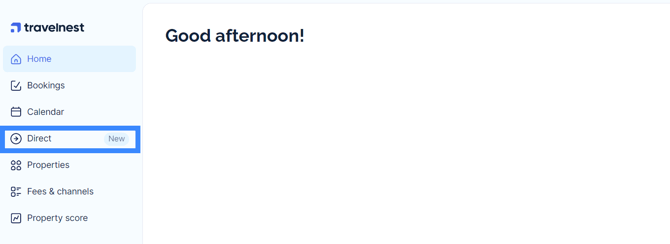
2. Choose your property
Find the property whose booking link you want to share. If you manage multiple properties, make sure you choose the correct one.
Use its unique link when promoting that property to potential guests.
What happens when a guest books?
Guests open your link, choose available dates and review the price, cancellation policy and house rules. They then enter their payment details through the booking page.
Travelnest handles payment processing and sends you the booking through your account, like other Travelnest bookings. Your Travelnest calendar updates to reflect the stay.
You remain responsible for guest communication, preparing the property and providing check-in details.
Frequently asked questions
How is Direct different from other booking channels?
Booking channels help travellers discover accommodation through their own websites and marketing. With Travelnest Direct, you promote your own booking page by sharing its link.
For ideas, see How to share your Direct Booking URL/link.
Where can I find my listings?
Open Direct in your Travelnest account to access your Direct property links. These are separate from the channel listings shown under View listings in your Property Profile.
How do I take payment?
Guests enter their payment details through your Travelnest Direct booking page. Travelnest processes the payment, so you do not need to take card details or collect the booking payment yourself.
How much does it cost me?
Travelnest Direct bookings have a 5% Travelnest fee, including payment processing, with no additional booking-channel commission. VAT may apply to the fee depending on your account’s circumstances.
For the full explanation, see How does Travelnest commission work?.
When does the guest pay?
Guests provide payment details during checkout, and Travelnest processes the payment as part of the booking process.
If a payment cannot be completed, follow the payment communications for that booking. Do not assume that entering card details means payment has succeeded.
What if I need to cancel a booking?
Contact the guest to explain the situation, then open the relevant booking in your Travelnest account and submit a cancellation request through that booking.
For instructions, see I can’t host a guest’s booking and need to cancel it.
Informing the guest or submitting a request does not, by itself, confirm that the booking has been cancelled. Wait for cancellation confirmation.
What happens if a guest wants to amend or cancel their booking?
The cancellation policy shown when the guest booked determines any refund entitlement. A request within the free-cancellation window is handled under that policy.
If the guest requests a refund exception outside the policy, your approval is needed before a discretionary refund can be agreed. Amendment requests also depend on availability and the applicable booking conditions.
Ask the guest to use the contact details in their booking confirmation, and contact Host Support if help is needed to process the request. Do not promise that a change or cancellation is complete until it has been confirmed.
Do I need to turn on Direct?
No. Direct is included for Travelnest properties that have completed validation and are live and bookable. Open Direct to access the property links you can share.
How can I share an idea to improve Travelnest?
We welcome your feedback. If you have an idea to improve Travelnest, contact Host Support or complete our feedback survey.