
Viewing your listings on booking sites
If you cannot find your property on a booking site, check your Travelnest account first. Searching directly on booking sites is not always a reliable way to find your own listing, as results depend on the dates, filters, location and number of guests searched.
Your Travelnest account shows the status of your channel listings and lets you open live listings directly.
How do I view my listings?
If you manage multiple properties, make sure you select the correct property before checking its listings.
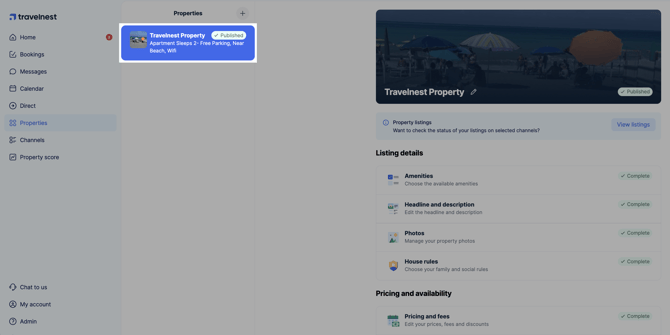
1. Open your property
Log in to your Travelnest account, go to Properties and select the property.
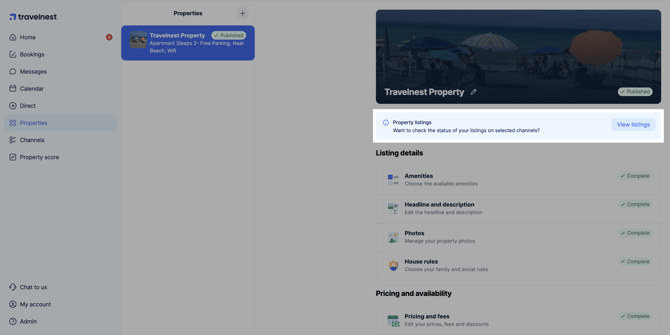
2. View your listings
Select View listings beneath the property’s cover photo, then find the booking channel you want to check.
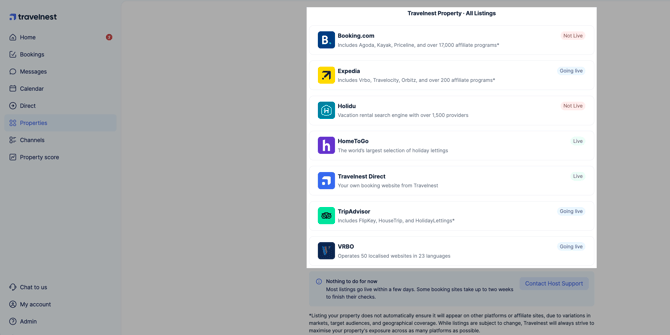
You can see the listing’s status and open it directly on the booking channel.
3. Open the channel listing
Select the relevant channel listing to open your property on that booking site.
Why can’t I find my property by searching on a booking site?
Not finding your property in search does not necessarily mean it is offline. Search results may be affected by:
- Unavailable dates.
- Price, guest numbers, amenities or map filters.
- The listing appearing further down the results.
- The inventory available through an affiliate site.
Use the direct link in View listings rather than relying only on a manual search.
What if I cannot find or book my listing?
Use the guide that matches the issue:
- Your listing is missing or no longer live: See Why can’t I find my property on a booking channel?.
- Your listing is live but guests cannot book some or all dates: See Why can’t guests book my property on a booking channel?.