
Why we recommend a cleaning fee
We recommend charging a separate cleaning fee rather than building cleaning costs into your nightly price. Guests pay the fee once per stay, rather than as part of every night’s price, so the cleaning charge does not increase with the length of the stay.
Compare your total stay price, including the cleaning fee, with similar properties rather than looking only at the nightly price. Keep the fee close to what a clean actually costs you.
If you manage multiple properties, make sure you select the correct property before adding or updating its cleaning fee.
How much to charge
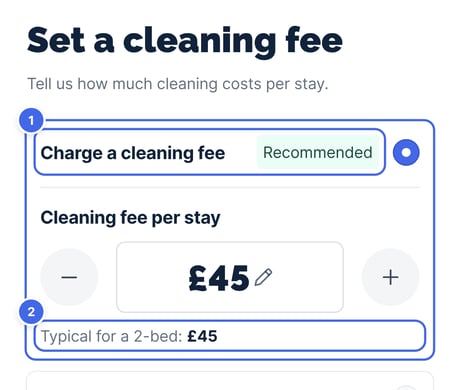
When you set your prices during setup, choose Charge a cleaning fee, marked Recommended (1). Travelnest shows the typical fee for a property with your number of bedrooms (2). Use that amount or set your own.
You can charge between 5 and 600 per stay, in your property’s currency.
How you're paid your cleaning fee
Your cleaning fee is paid to you with the rest of your booking, and it's treated just like your nightly price. The booking sites take their commission on everything a guest pays, including cleaning, so the same commission applies to both.
That means a separate cleaning fee costs you nothing extra compared with building cleaning into your nightly price. Guests simply pay for it once per stay instead of every night.
Read How Travelnest commission works for more information.
How to add or change your cleaning fee
You can view or update your property’s cleaning fee on the Travelnest website or in the mobile app. Follow the instructions and screenshots labelled Website or Mobile app, depending on which you’re using.
1. Open your property
Log in to your Travelnest account. From your homepage, select the property you want to update.
2. Go to Pricing and fees
Scroll down to Pricing and availability (1) and select Pricing and fees (2).
Website

Mobile app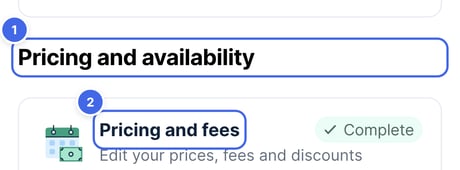
3. Set your cleaning fee
- Under Fees, select Cleaning fee.
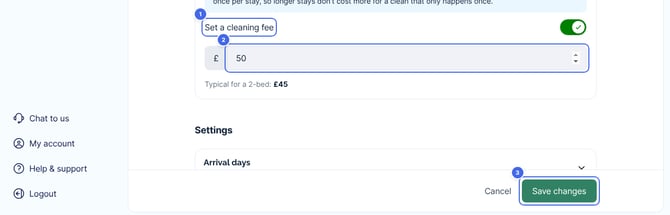
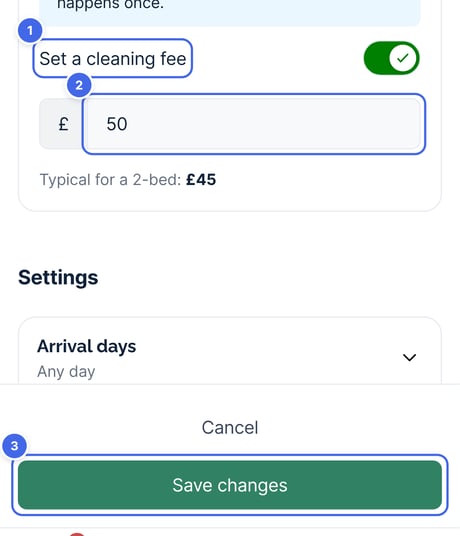
- Turn on Set a cleaning fee (1).
- Enter the amount you want to charge per stay (2). Travelnest shows the typical fee for a property with your number of bedrooms.
- Select Save changes (3).
Website
Mobile app
Travelnest tip If you've built cleaning costs into your nightly or minimum price, lower it by about the same amount when you add a cleaning fee, so guests don't pay for cleaning twice. Keep your fee close to what a clean actually costs you.
Frequently asked questions
Can I add a cleaning fee after a booking has been made?
No. Once a booking has been confirmed, you cannot add a mandatory cleaning fee to it. You can ask whether the guest is willing to pay it, but a fee that was not included when they booked cannot be required under this process. Any cleaning fee you add or change applies to future bookings.
Is my cleaning fee part of my minimum price?
No. Your minimum price covers the accommodation only. Your cleaning fee is added on top, once per stay.
Do promotions and discounts apply to my cleaning fee?
Promotions and discounts apply to your nightly price, rather than your separate cleaning fee.