
Understanding optional fees for your property
Travelnest does not collect additional fees such as pet charges or tourist tax as part of its booking process. If these apply to your property, make sure guests understand what is included in their booking price and what is payable separately.
Optional extras are services a guest can choose to purchase. Do not describe every additional charge as optional: a tourist tax or a charge that applies when a guest brings a pet may need different treatment.
How to communicate optional extras
If you offer optional services or amenities, explain them clearly in your property description. Include:
- What the extra includes.
- How much it costs and whether the charge is per stay, per night or per guest.
- That it is separate from the booking price already paid.
- How the guest can request it and arrange payment.
You can also contact guests before their stay to ask whether they would like to purchase an optional extra. Keep it clear that choosing not to purchase an optional service does not change what is already included in their booking.
Please note: Booking.com and Expedia automatically generate listing descriptions, so optional extras included in your Travelnest property description are not automatically included in those descriptions.
For Booking.com, you can manually describe optional extras in the free-text Property Information section. This has a 2,000-character limit, so prioritise the most relevant information.
Cleaning fees
Travelnest supports cleaning fees as these are mandatory and accepted by all channels, and we recommend adding one. Guests pay it once per stay, and booking sites include it in the total price guests see when they search.
To add or update it, open the relevant property in your Travelnest account, go to Pricing and availability (1) and select Pricing and fees (2).
For more information, see Cleaning fees
Website

Mobile app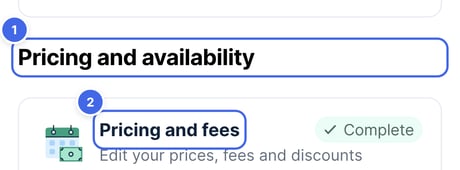
Travelnest tip Clearly communicate any optional extras in your listing description or in direct messages to guests. This ensures expectations are set and provides the opportunity to offer additional services, while keeping your booking fees transparent and accurate.