
How security deposits work
A security deposit can help cover damage or additional cleaning during a stay, subject to the terms disclosed to the guest and the booking channel’s rules.
Travelnest does not collect, hold or refund security deposits. Where a host-collected deposit is permitted, you set the amount, collect it and arrange its return directly with the guest. Any deduction must follow the agreed terms and applicable channel requirements.
If you manage multiple properties, make sure you select the correct property before adding or updating its security deposit.
Which bookings can use a security deposit?
No. It depends on the booking channel the guest used.
Airbnb bookings don't use host-collected security deposits. Airbnb provides AirCover, which offers protection for guest damage, so you don't need to collect a deposit from Airbnb guests.
Other booking platforms work differently. For bookings from Booking.com, Expedia, Vrbo, Holidu, HomeToGo and affiliates, the platforms don't offer host damage protection, don't enforce damage claims for you, and leave hosts to manage deposits and resolve disputes directly with guests.
If you choose to use a security deposit on these bookings, you set it, collect it and manage it yourself. Travelnest doesn't collect or hold deposits, and any deductions are agreed directly with the guest.
How to add or change your security deposit
You can view or update your property’s security deposit on the Travelnest website or in the mobile app. Follow the instructions and screenshots labelled Website or Mobile app, depending on which you’re using.
1. Open your property
Log in to your Travelnest account. From your homepage, select the property you want to update.
2. Go to Security deposit
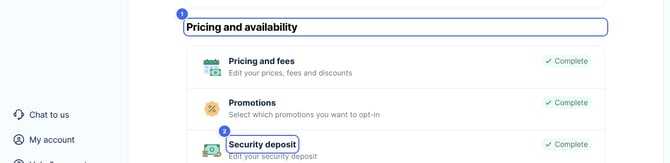
Scroll down to Pricing and availability (1) and select Security deposit (2).
Website
Mobile app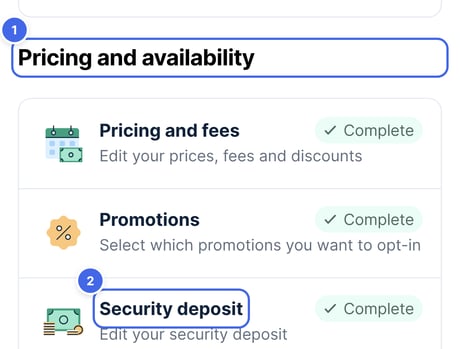
3. Set your security deposit
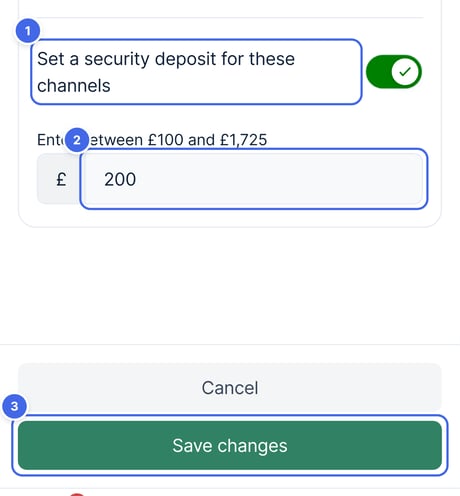
- Turn on Set a security deposit for these channels (1).
- Enter or adjust the amount you want to charge per stay (2).
- Select Save changes (3).
Website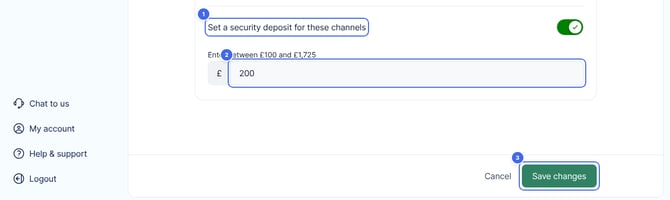
Mobile app
Travelnest tip We strongly advise against setting a very high security deposit—especially for a new listing. Depending on your property type and location, charging more than £300 may reduce search visibility on booking sites and discourage potential guests from booking.
Frequently asked questions
What should I do if a guest causes damage?
On Airbnb bookings, claims need to be submitted after checkout. You'll need photos, a description of the damage and the repair or cleaning costs. Nesti can collect these details and pass them to Host Support to submit an AirCover claim for you.
On other platforms, you can keep some or all of a collected deposit if that's appropriate. If the damage costs more than the deposit, you'll need to contact the guest directly to agree next steps. Travelnest can't charge the guest or enforce payment, so you may also want to speak to your short-term let insurance provider.
What if my guest hasn't paid the security deposit?
If you require a deposit and the guest hasn't paid it, you can hold back the check-in details until you've received it. Please explain the requirement clearly and point them to your listing, where it's stated.
How you proceed is always your decision as the host. If your guest still won't pay, our guide on what to do if your guest won't pay the security deposit walks through the options.
Who refunds a security deposit?
If you collected a security deposit, you return it. You'll arrange the refund directly with your guest, as Travelnest can't make it for you. Airbnb bookings don't use host-collected deposits, so there's nothing for you to refund on those.
When should I refund a security deposit?
Please refund it as soon as you reasonably can after checkout, in line with the terms you gave the guest when they booked. The only exception is if you're keeping some or all of it to cover damage.
It can take a few working days for a card refund to show in the guest's account, so it's worth letting them know once you've sent it.
What if my guest says they haven't received their refund?
First, check whether you've already refunded it. If you haven't, please do so as soon as you can.
If you have, a screenshot or confirmation of the refund is the quickest way to show the guest it's on its way. Replying through the booking channel's guest messaging keeps everything in one place.
What happens if a security deposit isn't returned?
Booking channels tend to protect the guest. If a guest tells the channel their deposit hasn't been returned, the channel can step in and may recover the amount from you. Returning it promptly avoids this.
What can Travelnest help with?
Travelnest can:
- Help submit Airbnb AirCover claims.
- Explain deposit arrangements for your booking channel.
- Help you understand the next steps where applicable.
Travelnest cannot:
- Collect, hold or refund a host-managed security deposit.
- Access or reverse a deposit payment collected directly by you.
- Directly charge a guest’s card for damage.
- Guarantee that a guest will pay a damage claim or enforce your directly managed deposit deductions on your behalf.
For all non-Airbnb bookings, security deposits are managed entirely by you.