
Managing security and damage deposits
Security deposits are one way hosts can protect themselves against damage, extra cleaning, or rule breaches during a stay. How deposits work depends on the booking platform used.
This guide explains what Travelnest supports, what you’re responsible for as a host, and what to do if damage occurs.
Do all bookings use a security deposit?
No. Security deposits are handled differently depending on the booking channel.
Airbnb bookings
Airbnb bookings do not use host-collected security deposits.
Instead, Airbnb provides AirCover, which offers protection for guest damage. If damage occurs during an Airbnb stay, Travelnest can help submit a claim to Airbnb on your behalf after checkout.
You do not need to collect a deposit from Airbnb guests.
Other booking platforms
For bookings made through platforms such as Booking.com, Expedia, Vrbo, Holidu, HomeToGo, and affiliates, security deposits work differently.
These platforms:
-
Do not offer host damage protection
-
Do not enforce damage claims on your behalf
-
Rely on hosts to manage deposits and resolve disputes directly with guests
If you choose to use a security deposit for these bookings:
-
The deposit must be set, collected, and managed by you
-
Travelnest does not collect or hold deposits
-
Any deductions must be handled directly with the guest
Setting a security deposit
- If you'd like to add or remove a security/damage deposit from your listings, begin by selecting the relevant property from your homepage.
- Next, go to the Pricing & Availability section and click on Security deposit and cleaning fee.
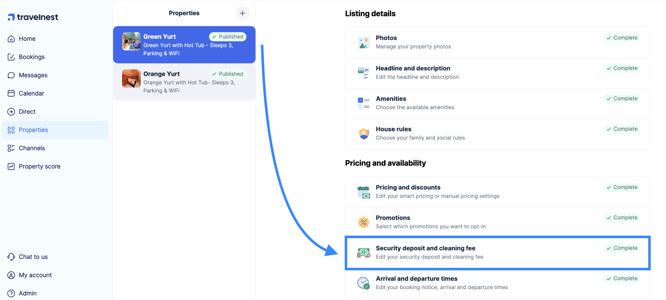
- Then simply turn the security deposit setting on, enter or adjust the deposit amount as needed, and click Save changes to apply it. This change will then be visible across all your property listings.
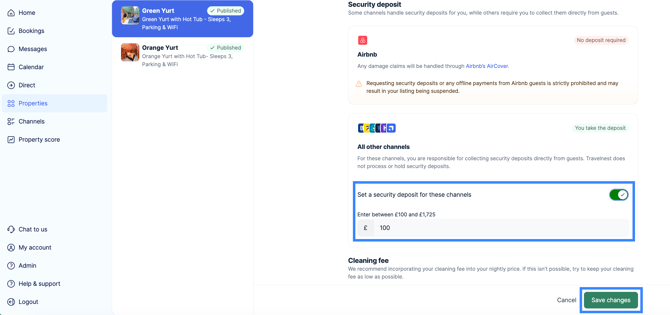
We strongly advise against setting a very high security deposit—especially for a new listing. Depending on your property type and location, charging more than £300 may reduce search visibility on booking sites and discourage potential guests from booking.
If a guest causes damage
Airbnb bookings
If damage occurs during an Airbnb stay:
-
Claims must be submitted after checkout
-
You’ll need photos, a description of the damage, and repair or cleaning costs
-
Travelnest (via Nesti) can collect the details and pass them to Host Support to submit an AirCover claim
Other booking platforms
For non-Airbnb bookings:
-
You can retain funds from a collected security deposit if appropriate
-
If damage exceeds the deposit, you’ll need to contact the guest directly to agree next steps
-
Travelnest cannot charge the guest or enforce payment
-
You may wish to involve your short-term let insurance provider
If a guest hasn’t paid a required deposit
If a deposit is required and the guest hasn’t paid:
-
You may withhold check-in details until payment is received
-
Clearly explain the requirement and reference your listing
-
If check-in is imminent and the guest is unresponsive, contact Nesti for guidance
The decision on how to proceed always remains with you as the host.
What Travelnest can and can’t do
Travelnest can:
-
Help submit Airbnb AirCover claims
-
Explain how deposits work by channel
-
Support you with next steps where applicable
Travelnest can’t:
-
Collect, refund or hold security deposits
-
Force guests to pay for damage
-
Deduct funds from guest cards
-
Enforce claims for non-Airbnb bookings
Refunds of damage deposits
If a guest is due a refund of their damage deposit, this must be returned by the host.
Travelnest cannot:
-
Issue the refund on the host’s behalf.
-
Access the deposit funds.
-
Process or reverse deposit payments.
A host has to make direct arrangements with the guest to refund the funds.
Important: For all non-Airbnb bookings, damage deposits are entirely managed by the host. Travelnest does not handle deposit payments or refunds.