
What is the Direct Discounts feature?
Direct Discounts lets you offer a percentage or fixed-amount discount on bookings made through your Travelnest Direct website. You can create a code or shareable link and set an expiry date for a limited-time promotion.
Share your discount through email, social media, messages or your own website, directing guests to complete their booking through Travelnest Direct.
Direct bookings do not have an additional booking-channel commission, but the Travelnest fee and any applicable VAT still apply. For more about Travelnest Direct, see Getting the most out of Travelnest Direct.
How do I create a Direct discount?
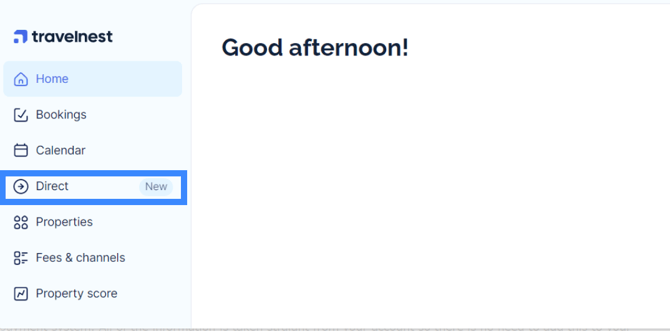
1. Open Direct
Log in to your Travelnest account and select the Direct tab to open your Direct Booking page.
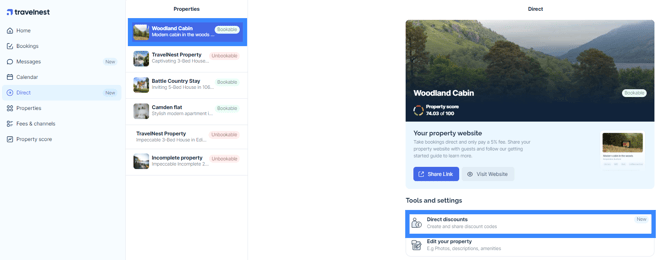
2. Open Direct discounts
Under Tools and Settings, select Direct discounts.
3. Create your discount
Set up the discount using the available options. Choose a percentage or fixed amount and add an expiry date if you want the promotion to run for a limited time.
How do I share my Direct discount?
After creating your discount, wait a few minutes before sharing it.
Choose one of these options:
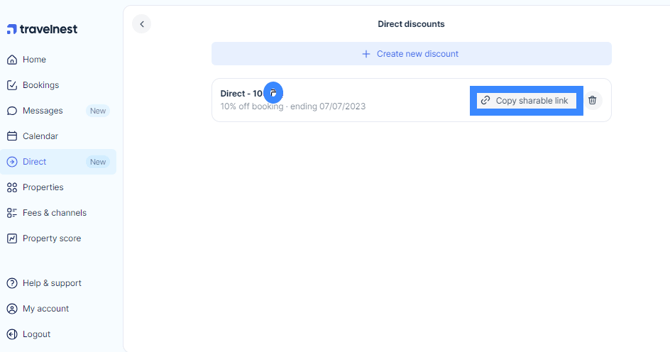
- Copy the code: Share the code with guests so they can enter it at checkout.
- Copy shareable link: Share the link on your website, social media or through messages. Guests who follow the link will see the discount applied during the booking process.
How will guests see the discount?
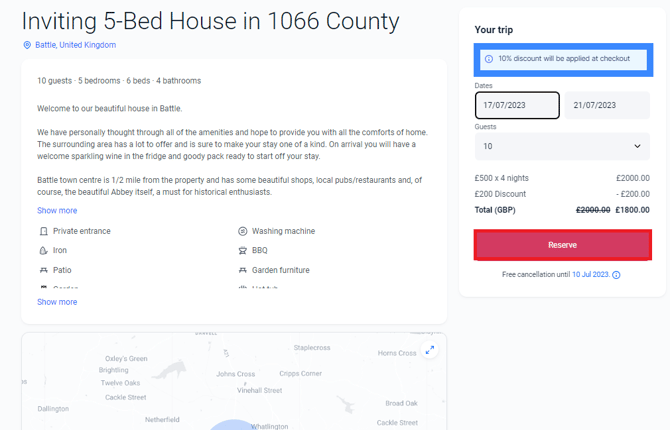
When guests follow your shareable link and select their stay dates, the discount appears in the booking breakdown.
Guests using a code can enter it at checkout. They should review the discount and final price before completing their booking.
Frequently asked questions
Can I change my pricing to offer discounts?
For a promotion specifically for direct bookings, use Direct Discounts rather than changing your underlying nightly prices. This lets you share an offer with Direct guests without editing the rates used for your other channel listings.
How can I share an idea to improve Travelnest?
We welcome your feedback. If you have an idea to improve Travelnest, contact Host Support or complete our feedback survey.