
Before you advertise your property
Check which tourist-accommodation category applies to your property in Asturias. Viviendas vacacionales (VV) and viviendas de uso turístico (VUT) have distinct registration procedures.
The procedures use a declaración responsable, a formal declaration that the requirements are met. Registration does not replace planning permission or other authorisations that may be required.
How do I register my property?
Check the requirements for your property
Confirm the appropriate category and procedure with the Principality of Asturias. Check with your local Ayuntamiento whether the intended use is permitted and whether municipal restrictions apply.
Do not assume that every property can use the same application form.
Gather your documents
Prepare the information and supporting documents required by the relevant procedure, including:
- Referencia Catastral: The property’s cadastral reference. Check your property documents, IBI receipt or the official cadastral search service.
- Tax and identification details: The appropriate NIF and identity information, such as DNI or NIE where applicable.
- Property-use and habitation information: The documents required to establish that the accommodation meets the applicable planning and suitability conditions.
- Civil liability insurance: Cover that meets the requirements for the accommodation activity, together with evidence of the policy and payment where requested.
- Operating rights: Information establishing who owns or is entitled to operate the accommodation, where required.
The official procedures specify minimum civil liability cover of €150,250, with any excess no higher than €602. Confirm that your policy covers the relevant tourist-accommodation activity rather than assuming ordinary home insurance is sufficient.
Apply online
Once your documents are ready, submit your declaration through the Principality of Asturias’s Sede Electrónica, using the procedure for your accommodation type: Vivienda vacacional (VV) or Vivienda de uso turístico (VUT).
- In the centre of the page, you will find a link to log in to the General Electronic Registry.
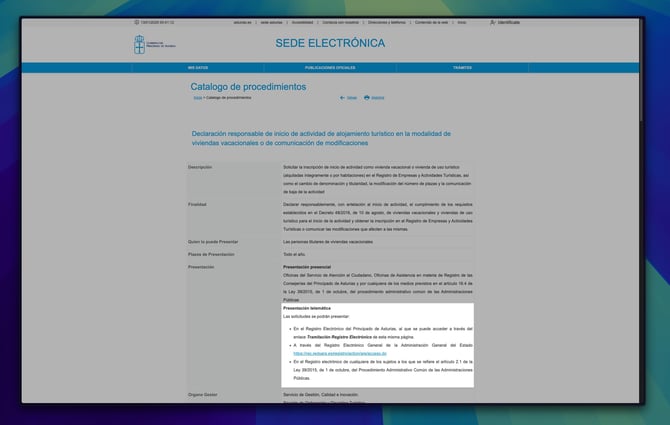
- Once you have logged in you will be presented with a form which you can use to register for a tourist licence.
If you need help with electronic identification or submitting the form, contact the Principality’s public-service support.
Apply in person
If you're finding the application process difficult, you can also apply in person for your tourist license.
- Visit the Sede Electónica (Electronic Headquarters) for the Principality of Asturias. Towards the bottom of the page, you will find a link to a Standardised responsible declaration.
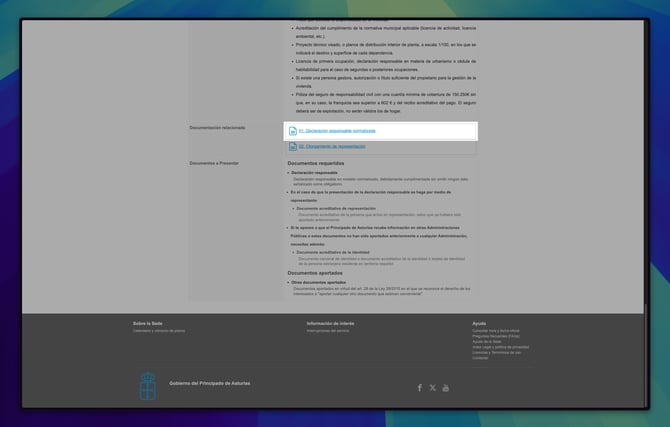
- Print and fill in the form and take it to your nearest Citizens' Service Office.
Receive your registration number
Once your application is approved, you will receive a confirmation email containing your Tourist Registration Number in one of the following formats:
- VV-1234-AS
- VUT-123456-AS
This registration number must be added to all of your property listings and advertisements.
How do I add my registration number to Travelnest?
To remain visible across booking channels, update your Travelnest account with your registration number:
- Log in to your Travelnest account, and go to the Local Licence and Tourist Tax section.
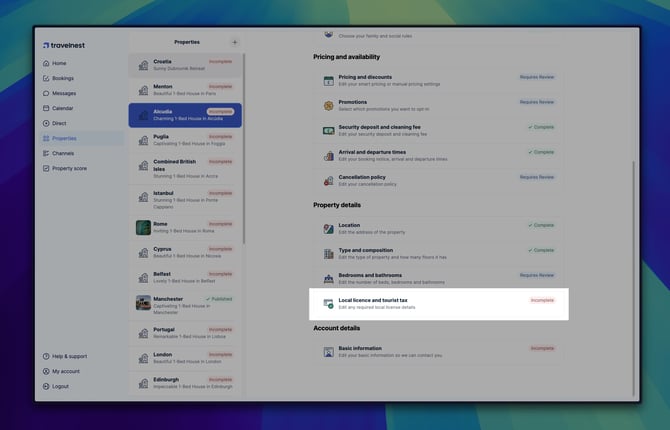
- Enter your registration number and any other local licensing details.
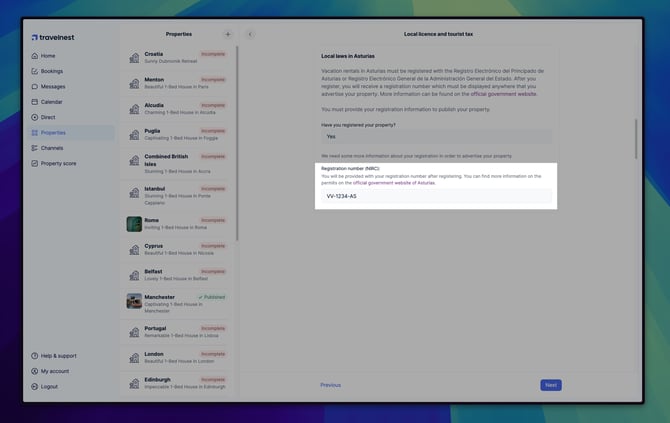
- Double-check your information and click Save changes.
Travelnest automatically shares your registration number with booking platforms such as Airbnb, Booking.com, and Vrbo, ensuring your property remains compliant and visible.
Where must I display my registration number?
Include the required tourism registration number wherever you advertise the property, including independently managed listings and personal websites.
Keep any separate registration references distinct. A cadastral reference is not a substitute for the tourism registration number.
What else should I check?
- Municipal restrictions: Confirm any local conditions on using the property for tourist accommodation.
- Ownership or operator changes: Ask the Principality which change-of-holder or other procedure applies. Do not assume the registration automatically transfers or that every sale requires an entirely new application.
- Ongoing compliance: Keep registration details current and meet the applicable operating requirements. Advertising or operating without the required registration can lead to penalties.
Where can I get help?
- The Principality of Asturias: Use the official contact service for registration and application guidance.
- A citizens’ service office: Check the official office information before visiting and confirm what assistance is available.
- Your Ayuntamiento: Ask about local planning and municipal requirements.
- Host Support: For help entering information in Travelnest, contact Host Support.
Travelnest can help with account information, but cannot confirm that your property meets every legal requirement.