
Before you advertise your property
Italy’s Codice Identificativo Nazionale (CIN) is a national identification code for accommodation covered by the registration rules.
Check which national, regional and local requirements apply to your property before advertising or accepting bookings. Obtaining a CIN and adding it to Travelnest do not, by themselves, establish full legal compliance.
Who needs a CIN?
The CIN requirements cover tourist accommodation and rentals within the relevant legal categories, including short-term rentals and properties let for tourism purposes.
Do not assume that a stay is exempt simply because a guest is travelling for work or study. Check the legal category of the accommodation or rental with the relevant authority.
How do I apply for my CIN?
Gather your documents
Before applying for your CIN, ensure you have the following ready:
- Proof of property ownership or management rights — Evidence that you are legally allowed to rent the property.
- Personal identification — Passport or Italian ID card.
- Certificate of Occupancy (Certificato di agibilità) — Confirms that your property is suitable for habitation.
- Regional or local identification codes — For example, CIR codes if applicable.
- Compliance certifications — Fire extinguishers, gas detectors, or other safety equipment where required.
Apply online
You can apply for your CIN through the Ministry of Tourism’s Banca Dati delle Strutture Ricettive (BDSR) portal:
- Visit the BDSR portal on the Ministry of Tourism’s website.
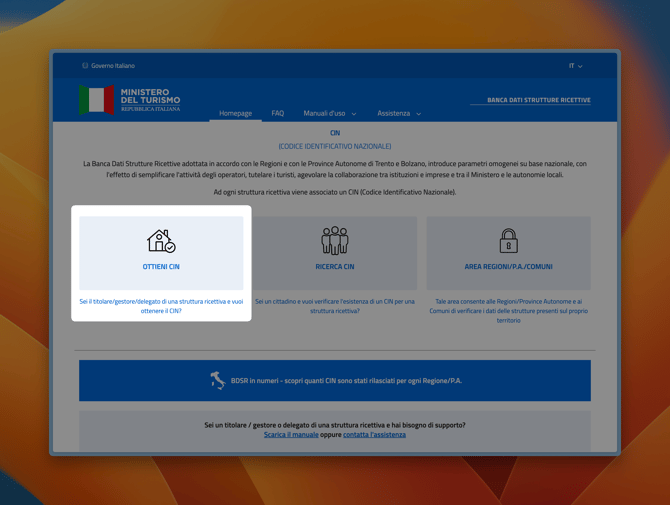
- Log in using your SPID (Sistema Pubblico di Identità Digitale) credentials. If you don’t have SPID access, you can register at spid.gov.it.
- Complete the registration form with key details about your property:
- Property type (e.g., holiday home, B&B, agriturismo).
- Address and location.
- Guest capacity (number of beds).
- Regional or local codes, such as the CIR.
Declare safety compliance
To finalise your application, you must confirm:
- Fire safety compliance — Ensure your property has a fire extinguisher.
- Gas safety compliance — Confirm the presence of gas and carbon monoxide detectors or declare "Not Applicable" if your property has no gas systems.
Receive your CIN
After completing the registration, your CIN is issued immediately. You’ll receive:
- A confirmation email with a downloadable PDF containing your CIN.
- Access to the CIN through the portal for future reference.
Update your Travelnest account
Once you’ve obtained your CIN, it’s crucial to update your Travelnest account to maintain compliance across booking platforms. Follow these steps:
- Log in to your Travelnest account, and go to the Local Licence and Tourist Tax section.
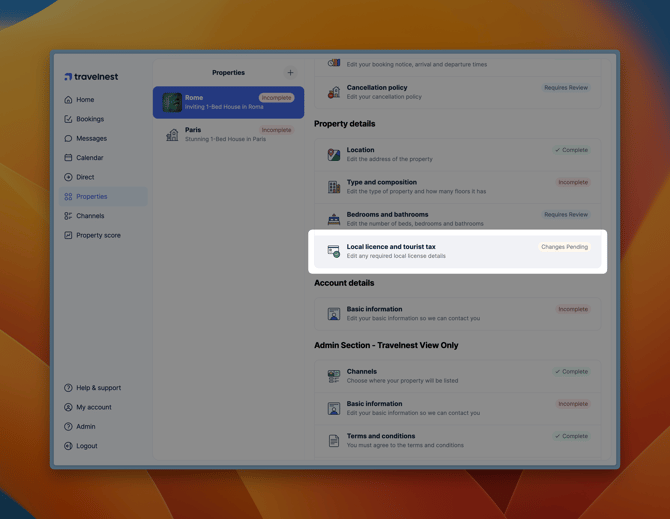
- Enter your CIN and any other required local licensing details.
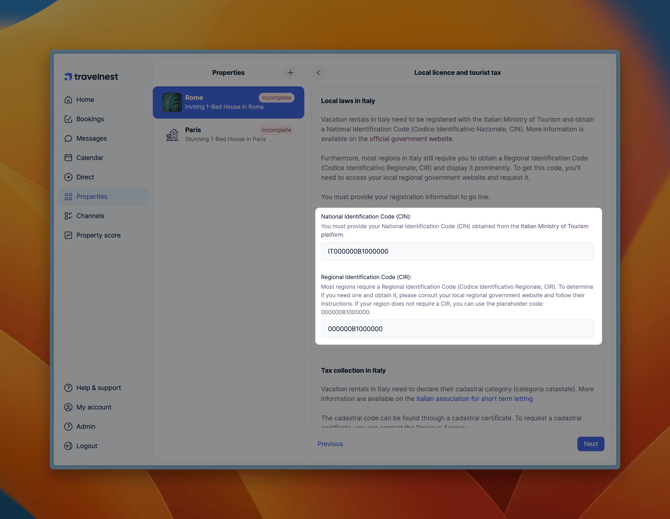
- Double-check your information and click Save changes.
This ensures your CIN is displayed across all platforms, including Airbnb, Booking.com, and Vrbo, ensuring your property remains compliant and visible.
Where must I display my CIN?
Include the CIN in advertisements and listings where required, including on any independently managed website or listing.
The rules also require display at the property. Check the applicable signage requirements before preparing or positioning the display.
What happens if I do not comply?
Failing to obtain or display a required CIN can lead to penalties. The amount and consequences depend on the breach and applicable rules.
Check the Ministry’s current guidance and any separate regional or local requirements before advertising.
Where can I get help?
- BDSR support or the Ministry of Tourism: Use the official portal’s current contact information for application and registration questions.
- Your regional or local authority: Ask about local registration and operating requirements.
- Host Support: For help with your Travelnest account or entering registration details, contact Host Support.
Travelnest can help with account information, but cannot confirm that your property meets every legal requirement.